Landscape
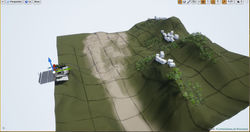
The petrol station I am using as reference is on the edge of the cliff and it faces a small hilly mountain. So using the landscape tool in an unreal engine, I started sculpting the terrain to match the reference images. After adding some boxes for scale reference of the buildings on the mountain in the far background I discovered that the scale of my landscape is bit tiny. Then I increased the size of the landscape to result the hill in the furthest section and sculpt a sort of a valley in between the petrol station and the facing hill.
The next step was to create a material for the landscape. Using the landscape coordinates and layer blend, I was testing out many texture combinations to use. But since the player can only move around the station and is not able to step on the actual landscape, it was a wise choice not to go too deep into the details since the camera/player would be far away, in addition to that the exponential fog effect. Therefore I opted to work with only 3 main materials: grass, dirt and rock. I didn’t give too much time into the detailing of the material painting process which was done using the landscape paint tool.
Then using the foliage tool, I scattered around a couple of trees on the curve of the hill
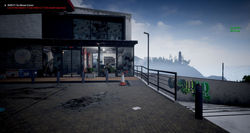
I also added simple meshes as buildings. I used 5 different sizes of boxes representing low poly buildings and splashed building façade textures on to them. I then placed them on my landscape and scattered them on top of the hills to form the far background of my player view.
 |  |  |  |  |
|---|---|---|---|---|
 |  |  |  |
Palm Tree
 |  |  |  |  |
|---|---|---|---|---|
 |  |  |  |  |
 | 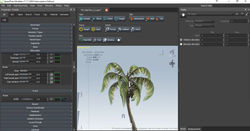 |  |
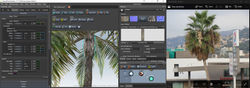
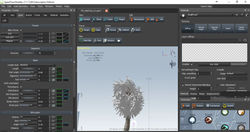
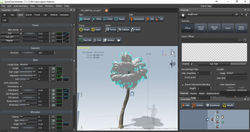
One of the main items in my scene is the palm tree on the entrance of the petrol station. Using Speed Tree I started modeling a tree similar to the references in my hands.
I started by giving the trunk the length I needed, added some character to it with a twist and bend using various forces in Speedtree. Same for the bark of the tree and the fronds.
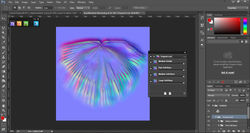
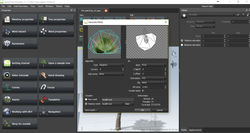
The only issue I faced was that the palm tree I had as a reference had smaller tropical leaves than the longer slimmer palm leaves. I found a texture similar to my reference, then using Quixel NDO, I generated a normal map relative to it. But the mesh output in Speedtree using the new texture wasn’t meeting my expectation after many trials with generating and altering the mesh from the texture in Speedtree and also trying to strip the texture of the leave down to one or three splinters of the leave.
Eventually, I used the tropical texture as the hanging dead palm leaves and the longer slim palm leaves as the main ones.
Foliage
Next, I had to work on the foliage in my scene. The foliage will be used on the entrance, on the land next to the petrol station and on the side border next to the Wash Zone.
I would also use grass weeds next to the blocked entrance and exit and inside the store where dirt have accumulated in the corners.
Using the plane technique, I would start off with a single plane in Maya. And then with preserve UV checked I would move the vertices around to shape the plane, and then duplicate it around to cover most of the view angles. Then I would merge the planes into one mesh and using vertex color I would assign black value to the bottom vertices (to pin them to the ground) while the edges and the leaves would assign white value to those vertices. And grey and in between shades of white and black accordingly. I created more than 8 or 9 foliage type and variation.
I also needed to scatter around few pebbles or small boulders. I found a very cool script that generates boulders, quartz and stalagmites. It was a very helpful script that helped me with few clicks to generate 5 meshes to be used as pebbles in my scene. And with the use of the foliage tool, I was able to paint and scatter some pebbles on the land next to the petrol station; I was also able to place couple of boulders inside the Café Bonjour.


Truck
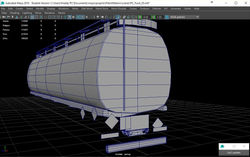
The exit of the petrol station had to be blocked, and after discussions with my tutor, a Petrol Tanker seemed like the perfect solution. After modeling the tanker I added some dirt piles on the ground and using the foliage and grass I modeled earlier I was able to block the petrol station exit.
 |  |  |  |  |
|---|---|---|---|---|
 |  |  |  |  |
 |
Containers
For the same reason as earlier, I needed to block of the view from the side of the petrol station. Stacked containers were the perfect solution to do so and a couple of trees. I modeled a container and in Substance Painter I created three different textures for the containers for variation.
 |  |  |  |  |
|---|---|---|---|---|
 |  |  |
RoadBlocks
Next I used the roadblocks with plywood to block off the entrance and exit of the petrol station to keep the player inside the scene plus to block off and limit its view.
I had two variations of the road block with each side that gives you four different sides to be used. As for the plywood, I had three different variations of the mesh.
That allowed me to have various blueprints of modules to be used in the scene and as mentioned earlier in the modularity section, variation is needed specially that this module is going to be used repeatedly from the entrance till the exit of the petrol station separating the interior of the petrol station from the highway which act as a foreground.


Highway
Even thou the player cannot access the highway he could still see a bit through peaking in between the road block and sealed entrance and exit. Therefore I had to model and populate the highway since it acted as background and it would give more life to my scene.
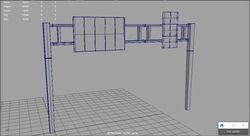
I added the facing wall, road block separators, highway street lights, the highway bridge and the highway sign
 |  |  |  |  |
|---|---|---|---|---|
 |  |  |