Blockout
Using the various pictures for the petrol station I took as reference, I was able to create a rough blockout, a basic greyboxing scene.

Zoning
I divided the project into 5 working zones: The Road, The Entrance, The Pumps, The Bonjour Café and the Landscape.
Having zones 2, 3 and 4 the core of the project and zones 1 and 5 serving as extensions to it.
 |  |  |
|---|---|---|
 |  | 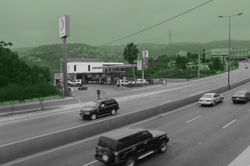 |
The Zone 1 would contain the main highway that serves as entrance to the petrol station.
The Zone 2 would be the entrance of the station, with the main Total sign, the price sign etc.
The Zone 3 would be the pump zone, where we have the petrol and diesel pumps and their structures.
The Zone 4 is the petrol station building which contains a shop, a washing zone and a service zone.
And the final zone, Zone 5 is the landscape in the far background.


MOSCOW List
Next had to set the M.O.S.C.O.W list, which contains the list of props and items that I must, should, could and won’t do in my project.
I also had set the priority of each mesh using a 4 point-scale from 1 to 4; 1 being critical and must do prop, 2 is high priority, 3 being medium and 4 being low priority.